Dunedin Golf Cart Parking Tips
We see it all the time at Beach Ride Rental, people eager to explore Florida’s best spots on a golf cart, booking theirs and having it delivered, only to call us, wondering if there are any special golf cart parking rules they should follow.
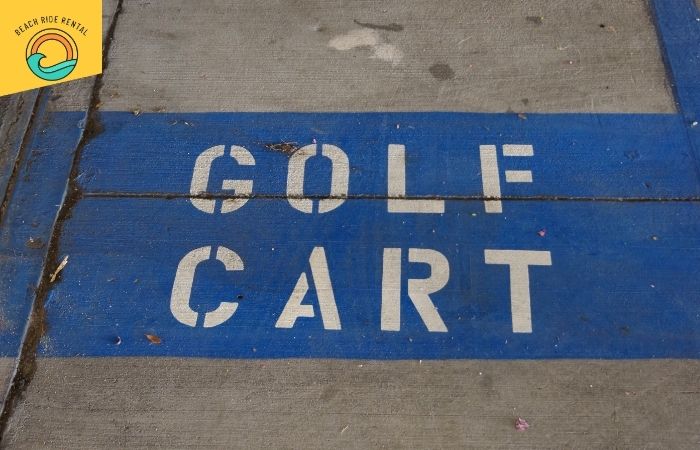
It can be pretty exciting to drive around on one of our little golf carts, and while Dunedin golf cart parking rules aren’t that different from full–sized car ones, there are still some differences you should be aware.
The Best Places to Park Your Golf Cart in Dunedin
Any driver out there knows that not all parking spots are equal, and that goes for golf carts as well.
Don’t worry, we’re not about to spring different rules for different areas on you. It’s just that some areas in Dunedin have objectively better parking spots for golf carts, and at Beach Ride Rental, we want to make sure you know the very best.
Main Street + Downtown Dunedin
Downtown Dunedin is where the vibes are, and thankfully, golf carts are welcome here, too. Better yet, downtown parking rules for golf carts are not too different from regular rules.
You’ll find standard vehicle spaces available for carts (yes, you can park in them), and during non-event days, there’s plenty of room near the shops, breweries, and restaurants, too, so sometimes, you don’t even have to go looking for special spots.
Just keep an eye out for signage during festivals and big events, as some blocks become pedestrian-only or have restricted hours for golf cart access.
Edgewater Park + The Marina
If you’re looking for a scenic stop near the water, you can’t go wrong with Edgewater Park, where you’ll find relaxing spots to chill and walk as you take in the sights and the laid-back atmosphere.
Parking here puts you steps away from the marina boardwalk, picnic tables, and dolphin-spotting views. You just need to arrive early to secure a good spot.
Beach Access Zones
While Dunedin isn’t your typical stretch of sand-and-towel coastline, there are a handful of coastal access points near the Dunedin Causewaythat are perfect for golf cart adventuring.
You can usually snag a spot along Causeway Boulevard (where legal) or in the nearby lots; just be mindful of time limits.
Heading toward Honeymoon Island? Golf carts aren’t allowed in the state park itself, but you can park just before the entrance and hop off to explore on foot.
Trailheads + Hidden Gems
Exploring the Pinellas Trail? Smart move; it’s a fantastic way of getting some exercise before exploring the city. Just keep in mind that, no matter how small, golf carts aren’t allowed on the trail itself.
Don’t worry, though. Parking near the trail entrances—like the one off Douglas Avenue—lets you stroll straight into beautiful bike paths and local art installations, which make this an obligatory spot if you’re the active sort of traveler.
Here’s a handy-guideon the rules you should keep in mind if you’re exploring the Pinellas Trail.
Where Not to Park Your Golf Cart in Dunedin
Even though Dunedin is known for being golf cart–friendly, there are still a few spots where carts just don’t belong, and some can catch you off guard if you’re not paying attention.
Event-Day No-Go Zones
When downtown hosts events like parades, craft fairs, or festivals, certain streets become off-limits, even if they’re usually okay for golf carts.
Keep an eye out for temporary signage and barricades, as even golf-cart parking spots you’ve used before can suddenly be off-limits for the safety of the pedestrian traffic.
If you want to avoid getting surprised by unexpected parking restrictions, it’s always a good idea to research if there’s a big event in the area or to find a seasonal public parking map of Dunedin.
In the meantime, here are some out-of-limit spots that will get you fined or towed:
- Private lots that are not clearly open to the public, especially those located in residential streets or behind restaurants or shops, should be avoided.
- Green spaces or park lawns, like those near Edgewater Park. Sure, golf carts are small, but they're still vehicles, and that's not allowed.
- Causeway shoulders with posted restrictions. You can take pictures at some places, but you must heed signs to know which are off-limits.
- Any space marked “No Golf Carts,” even if it looks wide open. The signs mean it.
Golf cart laws in Dunedin are pretty straightforward and very similar to those all over Florida, but they’re exactly that. Laws, not suggestion. Treat your golf cart like a vehicle and not a toy, and you should be able to avoid any issues.
Dunedin Parking Rules Guide
Knowing just a few local rules can save you a lot of stress (and maybe even a parking ticket). Florida golf cart regulations are fairly straightforward, and Dunedin is no exception.
- Standard parking spaces are fair game. If you see an open vehicle space, you can use it—just pull in like you would with a car.
- Two carts can share one space. Park side by side if there’s room. It’s totally allowed and kind of a pro move during busy hours.
- Handicap spaces are okay if you're eligible. Only park in those spots if you have a proper placard or tag.
- Watch for event signs and temporary restrictions. Especially in downtown zones during festivals, rules can change for a day or two.
- Never assume. When in doubt, check for signage, or ask a local (we’re friendly like that).
If you’re unsure about where to park or how the local rules apply, just ask when you book; we’re always happy to point you in the right direction (and maybe share a local tip or two while we’re at it).
In the meantime, you can check out this official government-issued Dunedin golf cart parking guide, complete with a map that’ll show you which areas of the city are golf cart friendly.
Park Easy, Cruise Happy
When it comes to exploring Dunedin by golf cart, the ride is only as good as the stop. Knowing where to park without second-guessing every sign makes your day smoother and the fun non-stop.
At Beach Ride Rental, we’re not just about the ride; we’re about the experience. Our clean, street-legal fleet is ready for anything: beach days, brewery hops, wedding weekends, or just a breezy cruise downtown.
Book your golf cart today, and we’ll make sure you’ve got everything you need to park smart, cruise easy, and enjoy every mile of Dunedin like a local.
FAQ'S
Most neighborhoods and coastal spots around town still follow the same rules: use a regular vehicle parking space, and always check for signage.
Every town’s got its own vibe and its own version of golf cart law. In some places, carts get front-row treatment. In others, you’re circling like it’s Black Friday at the outlet mall. Golden rule? Stick to marked vehicle spaces, avoid sidewalks (tempting, we know), stick to low-speed roads, and always give signs a quick glance before hopping out.
Quick drop-offs are usually fine, as long as you’re not blocking traffic or parked where signs say no. Think of it like pulling up to a coffee shop to let someone out: engine running, a wave goodbye, and you’re back in motion.
Just don’t leave your cart sitting there. Even for “just a minute.” You might be on vacation, but locals are working, running errands, etc.
Only when it’s clearly marked. Some park events allow temporary golf cart parking on grass (yep, really), but the rest of the time, stick to pavement. Edgewater and Highlander are great places to stop near, not in. As a general rule, if you wouldn't park a regular car there, that place is no good for golf carts either.
The core rules stay the same, but festival days bring surprises. One weekend you’re parking by the market, the next there's a barricade and a band playing where your cart used to sit.
Best move? Follow the signs, and if you're ever unsure, message us before you roll out. We'll help you steer clear of ticket traps.